Flat / Consultants and agencies
Send the report before your client meeting.
Publish your finished audit or strategy report and put the link in your meeting invitation. Your client can read the findings before the call and bring questions about the recommendations.
Checking your upload limits... · Public · Limits
Drop your client reports here
or choose files from your device.
Choose client reportsThis uploader creates public links. For private files, set a password through the CLI or API.
Let clients read at their own pace.
Your client can open an HTML report in the browser or read a PDF through Flat's viewer. Include the supporting workbook in a file collection when they need to check the numbers. They can download it for their own analysis after the meeting.
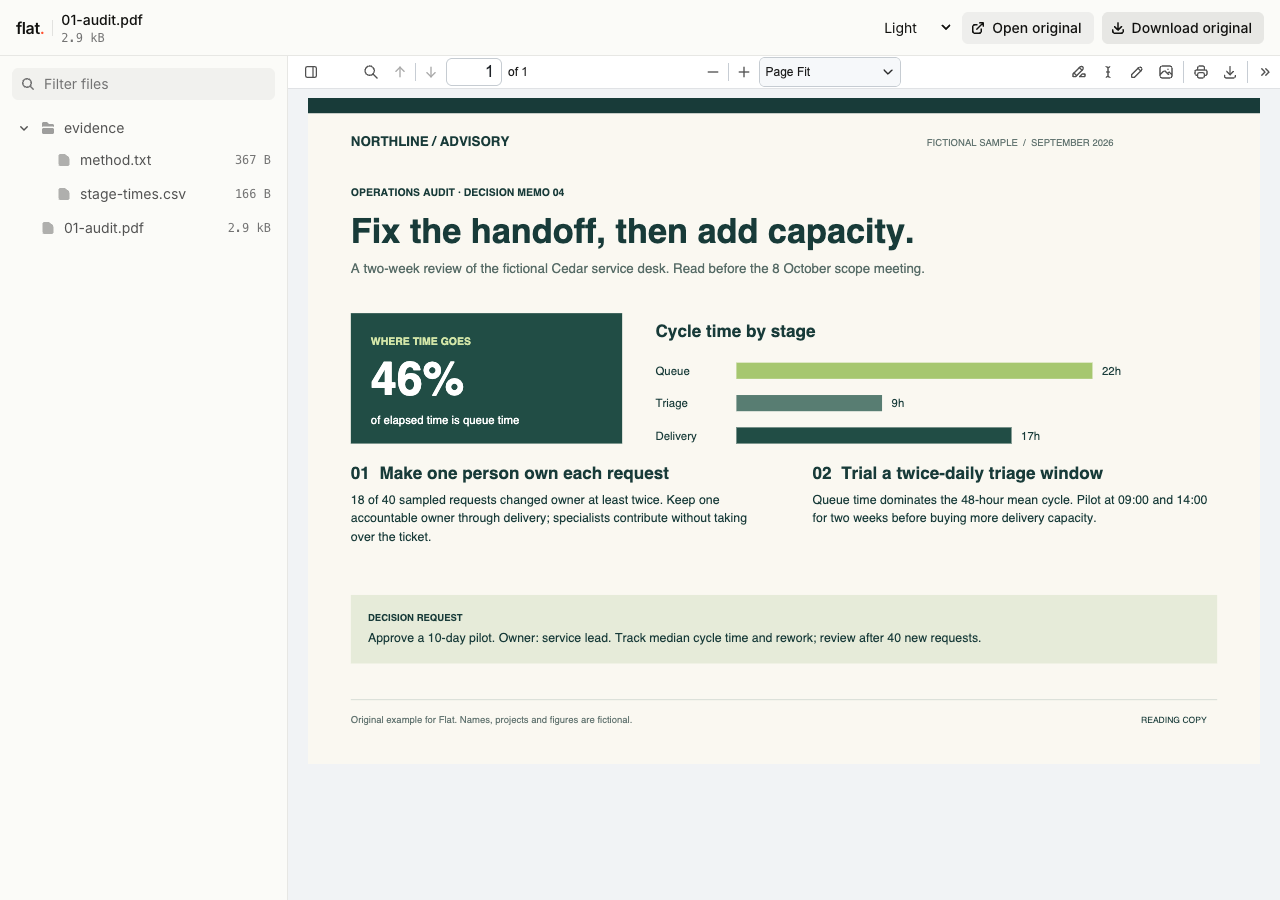
Read Northline's fictional operations audit, then inspect the stage-time CSV and method note. The report connects a 46% queue-time finding to a specific pilot proposal.
Extract the sample pack before uploading. To keep nested folders together, publish the extracted folder with the CLI.
Explain the recommendation beside the evidence.
Write the main finding near the start of your report. Give each recommendation a reference to the relevant chart or appendix so a client can check how you reached it. For a recurring engagement, state the reporting period and the scope of this review. The client can then distinguish this month's findings from the original project brief.
Prepare a report your contact can pass on.
Your client may need to brief someone who missed the presentation. Include enough context for that person to understand the decision you are asking for. Put the report link in your follow-up email with a specific request, such as choosing between two proposed scopes. Keep detailed implementation notes in a separate file for the team doing the work.
Prepare your files and share the link
1. Export the client copy.
Finish the report in your usual editor. Include the reporting dates and export a PDF or a finished static HTML report with its assets.
2. Publish the supporting material.
Upload the report and any supporting files. Open the published charts and check the workbook download before you send the link.
3. Add it to the meeting invitation.
Tell your client which pages to read beforehand. Ask them to bring questions about the proposed scope or the assumptions behind your findings.
Before you publish
Can I share an interactive HTML report?
Yes, if it works as finished static files. Include its JavaScript and local assets. Interactions that run in the browser can work; a report that needs your database or an application server needs those services elsewhere. Check the published report before delivery.
Can clients change the numbers in a workbook preview?
The spreadsheet preview is read-only and displays saved data. Clients can download the original workbook and edit it in their spreadsheet app. Include a PDF of important charts when their layout matters to your recommendation.
Who can open the link?
Browser uploads are public. Anyone with the link can open them without a Flat account. For restricted material, publish through the CLI or API with a visitor password set before you share. Recipients who have access can still download or forward copies. Set up password protection.
Can I replace files at the same address?
Yes. Publish through the CLI to a named onflat.page address or your own domain, then use that same domain for later uploads. Browser uploads create a new version link each time. Earlier version links and downloaded copies keep their original files. Set up a reusable address.
How long do uploads stay online?
Signed-in uploads have no default expiry. Signed-out uploads expire after one hour. Sign in before that deadline to keep them online. Your plan sets upload, storage, and transfer allowances. See pricing and limits.
Prepare your next client review.
Publish the finished report, then send the link with the question you want to discuss at the meeting.
Free to start. View pricing