Flat / Investor updates
Send investors the reading pack before the call.
Share your finished company update and supporting documents through one link. Set a visitor password through the CLI or API before uploading sensitive investor material. The browser uploader publishes public files.
Checking your upload limits... · Public · Limits
Drop your sample investor materials here
or choose files from your device.
Choose sample investor materialsThis uploader creates public links. For private files, set a password through the CLI or API.
Give investors context for their questions.
An investor can read your report in the browser and choose supporting documents from a file collection. Put the reporting period and metric definitions in the update. Readers can download the supplied files when they need to examine the figures before your conversation.
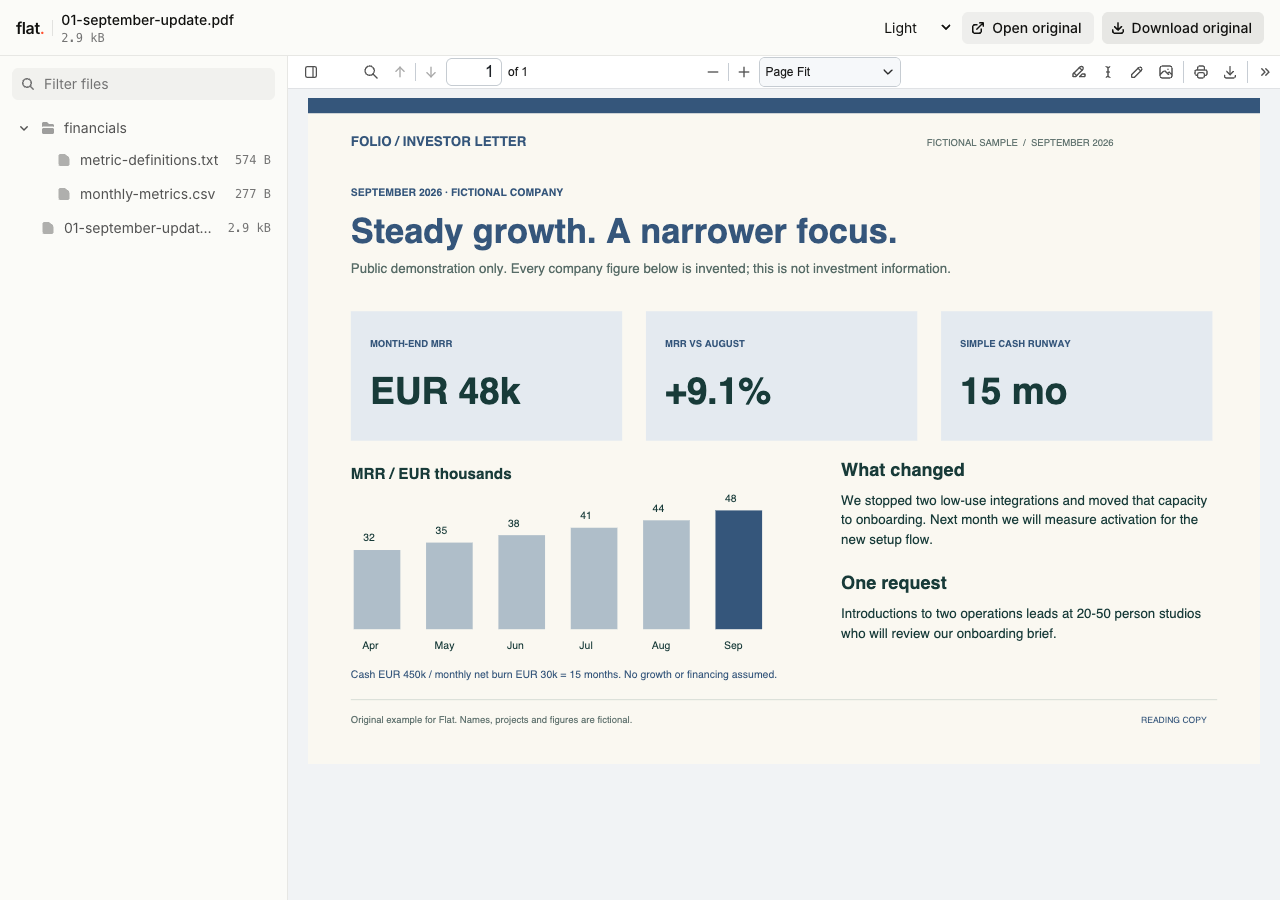
Folio's fictional September letter pairs a six-month MRR chart with a downloadable metrics CSV. The definitions explain the 9.1% growth calculation and simple 15-month runway assumption.
- Fictional investor update
- Sample monthly metrics
- Definitions and assumptions
- Download the complete sample pack
Extract the sample pack before uploading. To keep nested folders together, publish the extracted folder with the CLI.
Explain the period behind the numbers.
State the dates covered by your update and explain any changes in how you calculate a measure. Separate actual results from projections in the document. If you include a workbook, give investors a reference to the relevant sheet. This helps someone who missed the previous call understand what you are reporting and prepare a specific question.
Make the request clear in your email.
Paste the report link into your investor email or meeting invitation. Summarize the issue you want to discuss and identify any introduction or decision you are asking for. Keep detailed supporting material in the collection for readers who need it. You can use the same approach to send a finished pitch deck after an introductory conversation.
Prepare your files and share the link
1. Prepare the investor copy.
Finish the report and check the reporting dates. Select supporting files that explain the figures or the decision you will discuss on the call.
2. Set the password before upload.
Publish sensitive documents through the CLI or API with a visitor password set in the publication request. Use the browser uploader for public samples only.
3. Send the reading request.
Check the published documents, then send the link and password to your intended recipients. Identify the section you want them to read before the call.
Before you publish
Can I use Flat as an investor data room?
Flat hosts finished files and supports a shared visitor password. It is not a virtual data room with individual investor permissions or document activity records. Use a dedicated service when your diligence process requires those controls.
Can investors explore a financial model in the preview?
The spreadsheet preview is read-only and shows saved values, including cached formula results when available. It does not recalculate scenarios. Investors can download the original workbook for use in a spreadsheet app if you include it in the pack.
Who can open the link?
Browser uploads are public. Anyone with the link can open them without a Flat account. For restricted material, publish through the CLI or API with a visitor password set before you share. Recipients who have access can still download or forward copies. Set up password protection.
Can I replace files at the same address?
Yes. Publish through the CLI to a named onflat.page address or your own domain, then use that same domain for later uploads. Browser uploads create a new version link each time. Earlier version links and downloaded copies keep their original files. Set up a reusable address.
How long do uploads stay online?
Signed-in uploads have no default expiry. Signed-out uploads expire after one hour. Sign in before that deadline to keep them online. Your plan sets upload, storage, and transfer allowances. See pricing and limits.
Prepare the update for your next call.
Publish sensitive investor materials through the CLI or API with a password set before upload, then send your reading request.
Free to start. View pricing