Flat / Weddings and personal events
Give your guests the plan for the day.
Share an invitation or event guide with guests. Put the schedule and venue directions in a document they can check on their phone. Publish a PDF or a complete HTML event page.
Checking your upload limits... · Public · Limits
Drop your event guide here
or choose files from your device.
Choose event guideThis uploader creates public links. For private files, set a password through the CLI or API.
Help guests check the details on the way.
Guests open the PDF in their browser and can save a copy before traveling. If you include a separate venue map, they can select it from the file list. Use clear labels for ceremony and reception locations when they are different.
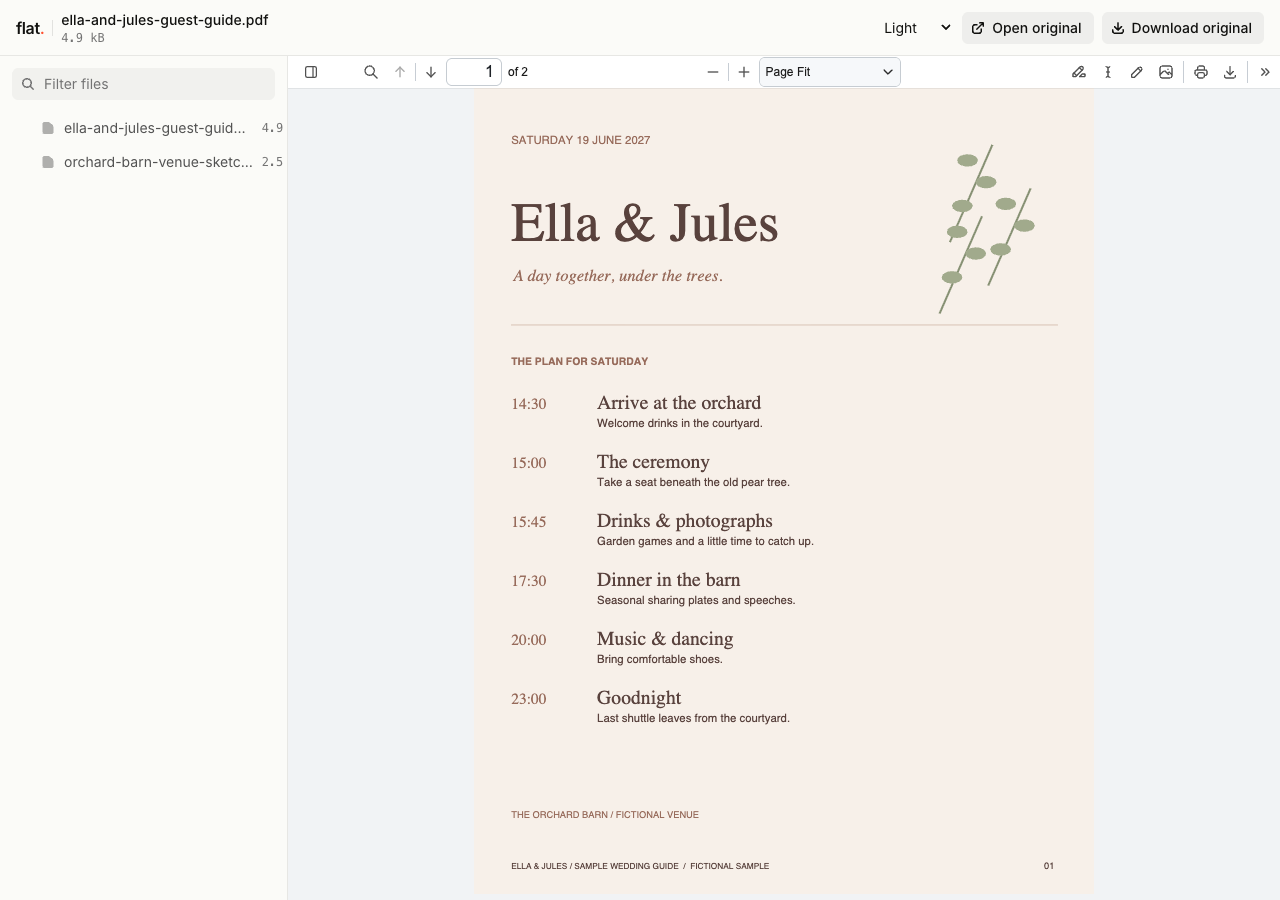
This fictional wedding pack gives guests the day's timings and practical notes. The companion map labels parking, the ceremony, reception, toilets, and a step-free route.
Extract the sample pack before uploading. To keep nested folders together, publish the extracted folder with the CLI.
Answer the questions guests need for arrival.
Put the date and arrival time near the start of the guide. Explain parking or transport arrangements beside the venue address, and include any accessibility information guests need to plan their journey. Check the map labels on a phone. For a custom event page, upload self-contained HTML or publish the complete static website folder.
Choose what belongs in the shared guide.
Prepare a public-safe version for the browser uploader. Leave out home addresses and guest lists. For private event details, configure password protection through the CLI before uploading. Share personal arrangements with the guests concerned through your usual messages while keeping general venue information in the guide.
Prepare your files and share the link
1. Finish the guest copy.
Confirm the venue details and timings with your organizers. Export the invitation or schedule, then review it for information you do not intend to publish.
2. Publish the prepared guide.
Upload the public-safe PDF with any venue map. Name each file by its purpose so guests can find the schedule without opening every document.
3. Check the route to arrival.
Open the link on your phone and follow the venue directions. Send it with the invitation once you have checked the address and arrival time.
Before you publish
Can guests RSVP through Flat?
Include a link to your existing RSVP form or tell guests how to reply. Flat publishes the invitation and guide. It does not collect RSVPs, meal choices, or guest messages, so keep responses in the service you use to organize them.
Can I share photographs after the event?
Yes. Publish the images you want guests to view and download, or export a photo album as a PDF. Recipients can save and forward the files. Flat does not provide a shared album where guests add their own uploads.
Who can open the link?
Browser uploads are public. Anyone with the link can open them without a Flat account. For restricted material, publish through the CLI or API with a visitor password set before you share. Recipients who have access can still download or forward copies. Set up password protection.
Can I replace files at the same address?
Yes. Publish through the CLI to a named onflat.page address or your own domain, then use that same domain for later uploads. Browser uploads create a new version link each time. Earlier version links and downloaded copies keep their original files. Set up a reusable address.
How long do uploads stay online?
Signed-in uploads have no default expiry. Signed-out uploads expire after one hour. Sign in before that deadline to keep them online. Your plan sets upload, storage, and transfer allowances. See pricing and limits.
Share the guide for your day.
Publish the finished guest information and check it on your phone before sending it.
Free to start. View pricing