Flat / Analysts and researchers
Share the findings with the data behind them.
Publish your finished analysis and the supporting files readers need to inspect it. Send the link in a research review invitation or project discussion so colleagues can prepare questions about your results.
Checking your upload limits... · Public · Limits
Drop your research files here
or choose files from your device.
Choose research filesThis uploader creates public links. For private files, set a password through the CLI or API.
Let readers inspect the published results.
Colleagues can read a report and inspect saved spreadsheet data in Flat. The spreadsheet view is read-only. Include a downloadable dataset when readers need to run their own analysis, and explain which table supports each finding so they can follow your method.
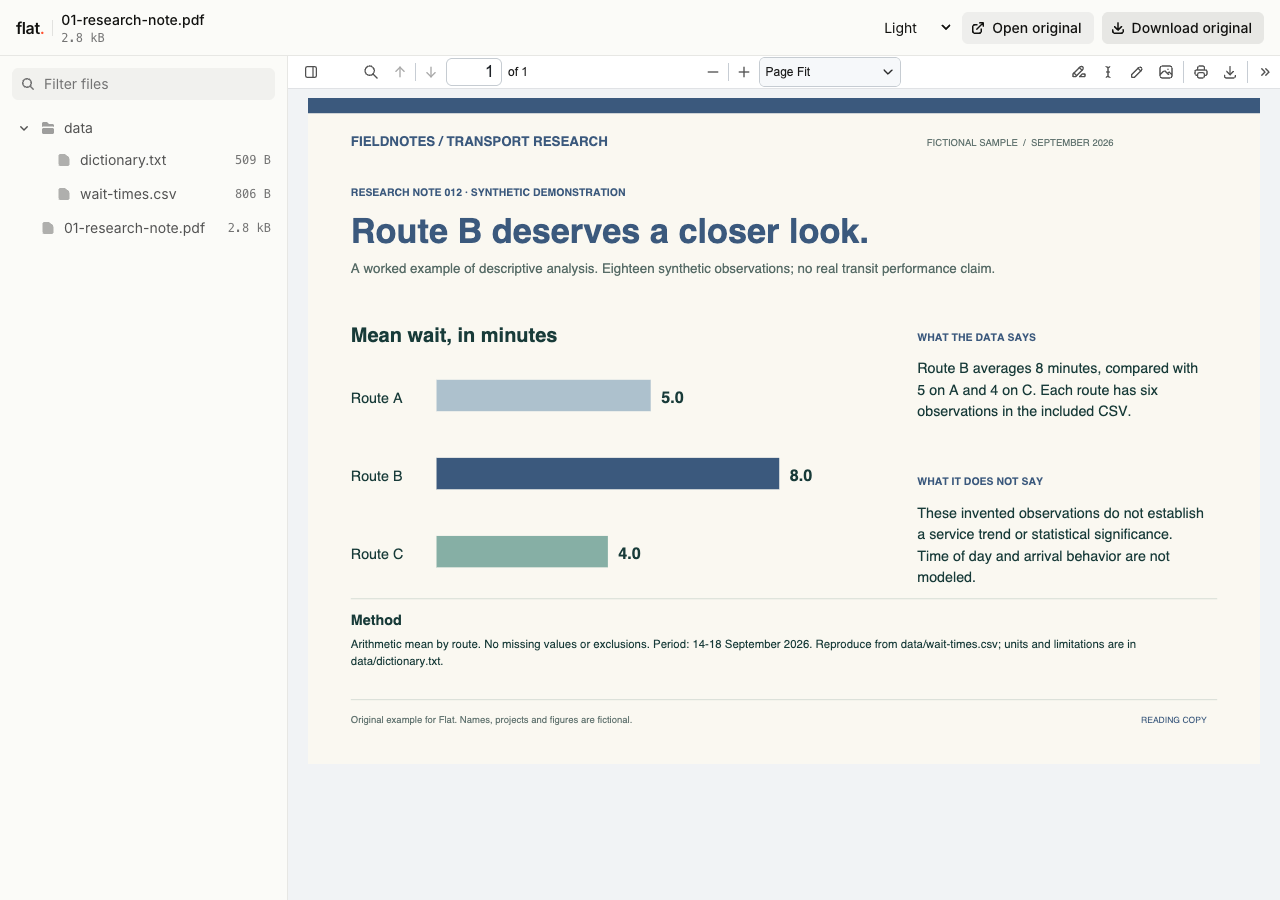
This worked example compares mean wait times across three fictional routes. The report's chart uses the included 18-row CSV, with units, calculations and limitations in a data dictionary.
- Research summary and chart
- Synthetic observation data
- Data dictionary and method
- Download the complete sample pack
Extract the sample pack before uploading. To keep nested folders together, publish the extracted folder with the CLI.
Give the dataset enough context.
Document the units and observation period in your report or a companion note. Explain missing values and any exclusions that affect interpretation. A reader opening the CSV should know what a row represents without having attended your analysis meeting. Include a data dictionary when abbreviated column names or category codes need explanation.
Publish a readable notebook export.
Export completed notebook output as static HTML or PDF for colleagues who want to read the results. Include the assets needed by an HTML export. Flat hosts the finished files; it does not run notebook kernels or refresh data from your source systems. State the extraction date in the report so readers know which data you analysed.
Prepare your files and share the link
1. Prepare the results for reading.
Export the completed report and save the supporting data. Add definitions for measures whose meaning would be unclear outside your research team.
2. Inspect the published figures.
Upload the files and check charts at the published link. Open the spreadsheet preview and compare important values with your saved source.
3. Send a focused review request.
Share the link in your project thread. Ask colleagues to examine a particular assumption or result and respond in the same discussion.
Before you publish
Will workbook formulas and charts run in the preview?
The grid displays saved data and cached formula results when available. It does not calculate formulas or reproduce workbook charts and exact styling. Export important charts as images or PDF pages, and include the original workbook for analysis in a spreadsheet app.
Can readers use interactive charts in an HTML report?
Browser-side interactions can work when the static export includes the required code and data. Check the uploaded report's controls before sharing. Interactions that depend on a notebook session or a backend do not become available by uploading the report.
Who can open the link?
Browser uploads are public. Anyone with the link can open them without a Flat account. For restricted material, publish through the CLI or API with a visitor password set before you share. Recipients who have access can still download or forward copies. Set up password protection.
Can I replace files at the same address?
Yes. Publish through the CLI to a named onflat.page address or your own domain, then use that same domain for later uploads. Browser uploads create a new version link each time. Earlier version links and downloaded copies keep their original files. Set up a reusable address.
How long do uploads stay online?
Signed-in uploads have no default expiry. Signed-out uploads expire after one hour. Sign in before that deadline to keep them online. Your plan sets upload, storage, and transfer allowances. See pricing and limits.
Prepare your analysis for review.
Publish the report with its supporting data and send colleagues the question you want them to examine.
Free to start. View pricing