Flat / PPTX hosting
PPTX hosting: share a PowerPoint presentation as a link
Upload a finished PPTX from your browser or the CLI. Send a link to a PDF preview of your slides, with the original PowerPoint file available to download.
Checking your upload limits... · Public · Limits
Drop your PPTX files here
or choose them from your device.
Select PPTX filesWhat readers see at your PPTX link
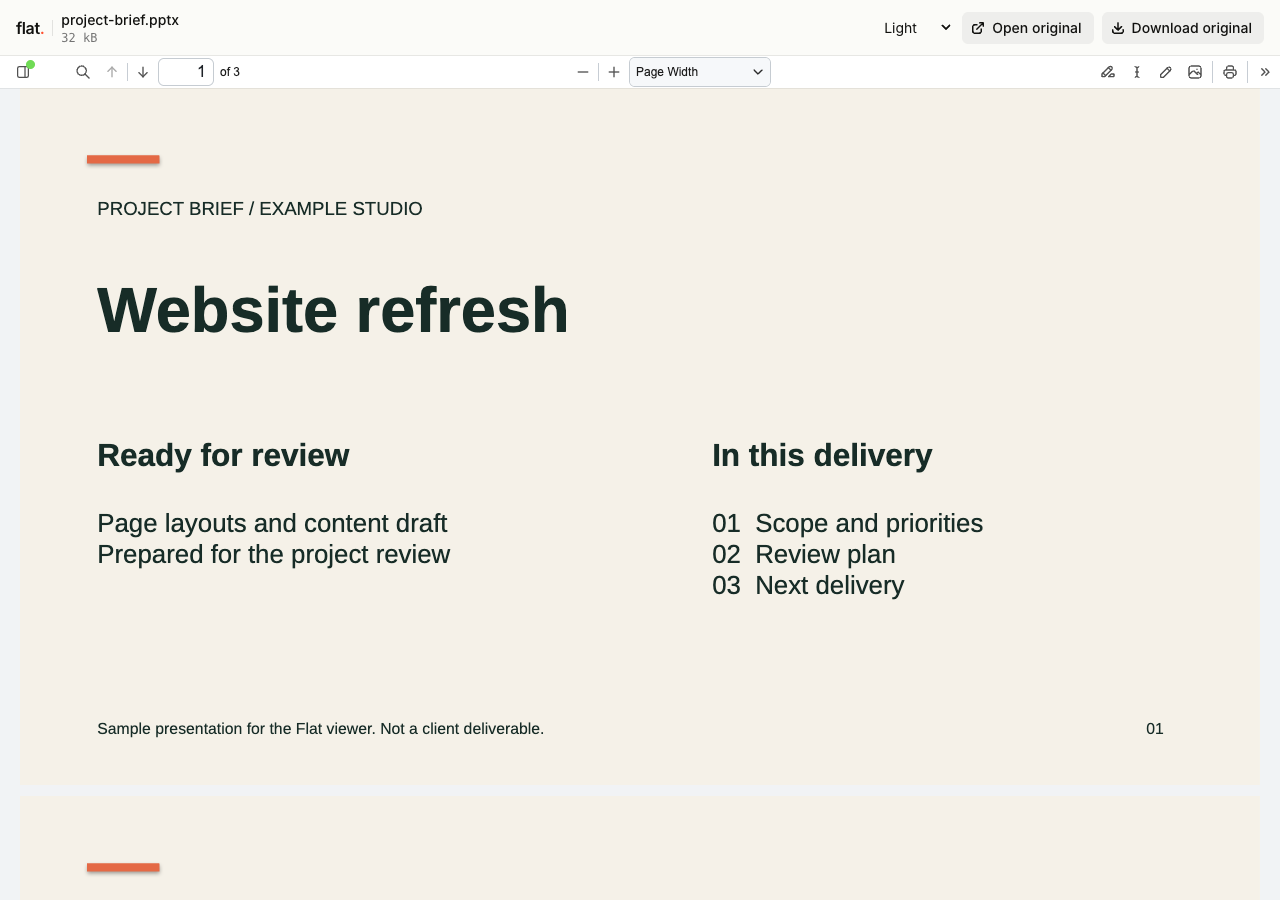
Flat converts the presentation to a PDF for browser reading. Readers can move between pages and zoom in on slides without installing PowerPoint. The screenshot shows a converted sample project brief.
The preview contains static slide pages. It does not play animations, transitions, narration, or embedded video. Readers need the original PPTX and compatible software for presentation playback or editing.
A single file opens in the viewer. Several files open in the explorer, where readers can choose a file. Public links need no Flat account. Original downloads remain available if a preview cannot load.
The main link opens Flat's viewer. The exact path /project-brief.pptx serves the original file, without changing its contents.
How to upload PPTX files and get a link
Prepare your file
Save the final deck as PPTX. Check fonts, charts, and image placement. Use self-contained slide content rather than assets that must be fetched from another location during conversion.
If a precise layout is essential, export a PDF in PowerPoint and publish that reading copy alongside the PPTX. Conversion can substitute fonts or change layout.
Publish from your browser or terminal
In your browserGo to uploaderDrop, publish, copy the link.
Drop your finished files into the uploader above, or select them from your device. Enter your email if signed out, then choose "Publish files".
Selected files need unique names and publish at the top level. Use the CLI for folders; the browser uploader does not accept folders or extract ZIPs.
TerminalNode.js 20+One command. Files or folders.
npx -y @getflat/cli deploy ./project-brief.pptxReplace the example path with your file. Pass a folder to publish related files with their relative paths intact. The CLI prints the published URL.
Check before sharing
Compare every PDF page with your deck, especially fonts, diagrams, and slides built with animation. Confirm the original PPTX download opens correctly before sending the link.
Signed-out uploads expire after 1 hour by default. Sign in before expiry to keep them online, or sign in before publishing for no default expiry.
What you can share with PPTX hosting
Client proposals
Give a client a browser-readable slide deck after a meeting. Keep feedback in your existing conversation and publish a new version after revisions.
Workshop materials
Share static slides with attendees and provide the original deck for trainers who need to adapt the material.
Keep a version, or keep an address.
Share this version
Every upload gets its own link. Publishing revised files creates a new link and leaves the earlier version unchanged. Use the version link when someone needs to review a specific upload.
Update files at one address
Use a named onflat.page address or your own domain. Sign in, then publish with the CLI using --domain. Publish revised files with the same domain to point that address to the new upload.
Named addresses are included on Free. Adding your own domain requires a paid plan. The browser uploader does not set up or repoint these addresses.
PPTX hosting questions
Is hosting free, and what are the limits?
Yes. Signed-in Free includes 5 MiB per upload, 1 GiB of storage, and 5 GiB of monthly transfer, with no default expiry. The per-upload limit covers all files in that upload. Paid plans raise these limits.
Do readers need a Flat account?
No. Public links open without a Flat account. Anyone with the link can open the uploaded files. Password-protected links also require the visitor password.
Can I password-protect my upload?
Yes. Password protection is available on every plan. Add --password YOUR_PASSWORD to your CLI deploy command. It protects access to the upload and its files, but does not prevent someone with access from saving a copy. The browser uploader creates public uploads.
Can I replace files without changing the link?
A version link always refers to its original upload. For same-address updates, use a named address or your own domain. Publish revised files with the same --domain value in the CLI to point that address to the new upload.
What happens when an upload expires?
Flat stops serving it. An expired upload cannot be recovered. Signed-out uploads expire after 1 hour by default. For browser uploads, use the sign-in link shown after publishing. For CLI uploads, run npx -y @getflat/cli login. Complete sign-in before expiry to keep the upload online. If you chose a shorter expiry in the CLI, that deadline stays in place.
Will PowerPoint animations and videos play?
No. The browser preview is a PDF, not a PowerPoint slideshow. Share the original PPTX for compatible presentation software, or publish a separate video export when timing and narration matter.
Can readers edit or comment on the slides in Flat?
No. Flat provides reading and original-file downloads. It does not offer slide editing, shared cursors, or comments. Use your presentation editor for changes, then publish the revised deck.
Can I share only the preview and hide the PPTX?
Publish only a PDF exported from your editor if you do not want to distribute the editable deck. A PPTX upload keeps the original available to readers with access.
How large can an upload be?
Upload allowances depend on your plan and cover all files in the upload. Compare current plan limits. Preview availability also depends on format and processing support. The original file remains available to download if a preview is unavailable.
Can I embed the viewer on another website?
Flat's generated viewer cannot be embedded in an iframe and keeps Flat branding on every plan. Link to the viewer for reading or to the exact file URL for the original.
Another presentation format?
Find the guide for your presentation file.
Give your PPTX files a link.
Publish your file, check the preview, and share the URL.
Publish filesFree to start · View pricing