Flat / Vercel alternative
Share a finished site or a folder of documents.
Use Flat to publish static HTML or send clients documents they can preview and download. Upload files in your browser or publish a folder with the CLI. Keep Vercel for apps that need its builds and server runtime.
Start free with a document or finished HTML page.
Send the proposal with its supporting files
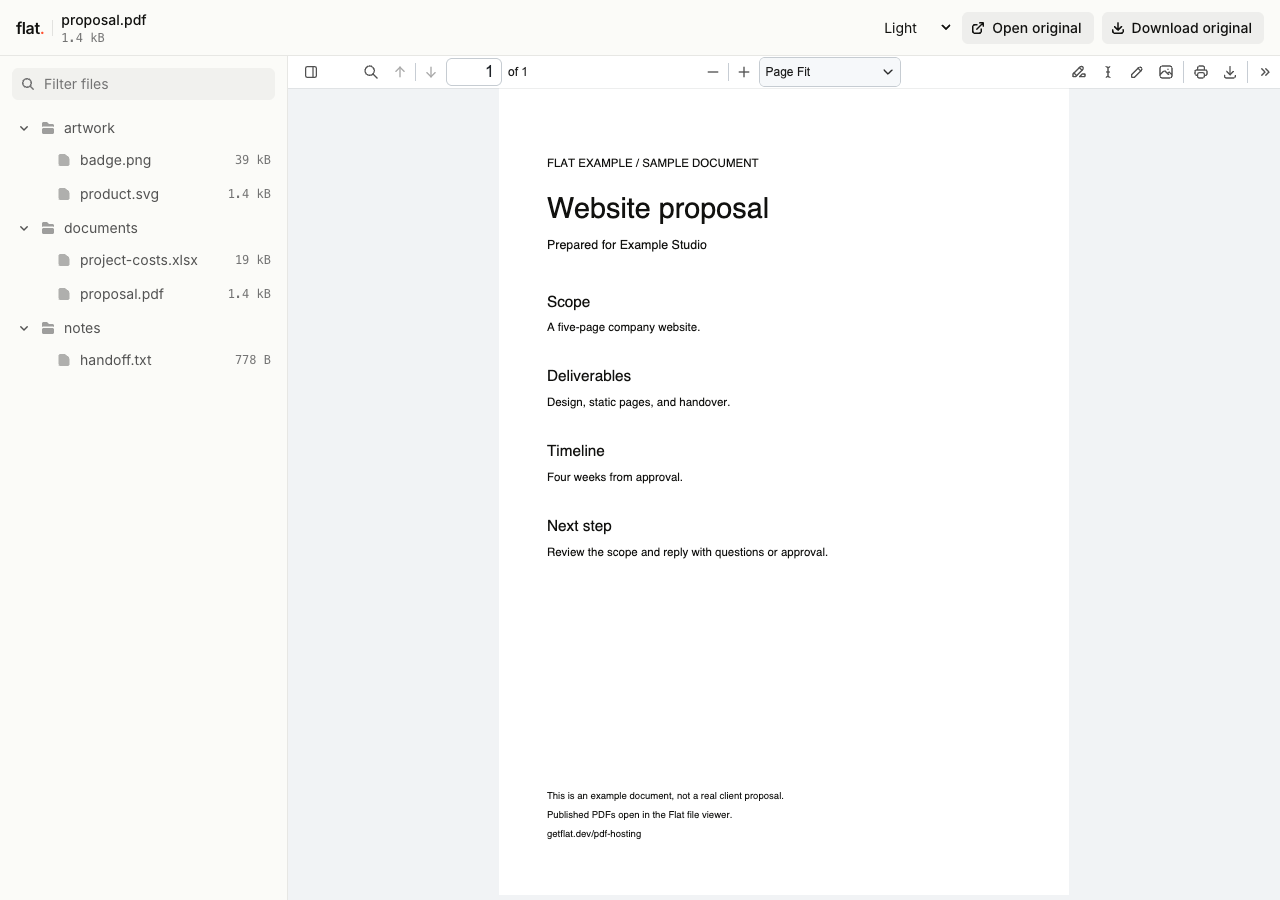
Publish a proposal PDF with its cost workbook and reference images. Flat gives your client a file list, so you do not have to build a page linking to each document.
Readers can open supported previews and download the originals. Spreadsheet previews show saved values; readers use their own apps to edit the files.
A root index.html opens as your website instead of the file explorer. Publish documents separately when you want the browsing view shown here.
Flat vs Vercel
Both services publish without Git and provide version-specific links. We checked Vercel's official docs on .
| What you need | Flat | Vercel |
|---|---|---|
| Publish without Git | Upload individual files in your browser, or use the CLI for folders and nested assets. Extract website ZIPs before publishing. | Sign in and use Vercel Drop for HTML files, folders, or ZIPs. It can build supported framework projects. CLI and API publishing also work without Git.Source |
| Share a finished report | Publish HTML as a page, or share documents in a file explorer with previews for supported formats and original downloads. | Deploy an HTML report as a website. For a document collection, include your own index page and any viewing UI you need.Source |
| Keep one address for updates | Use the CLI or API to point a named address or custom domain to each new upload. Browser uploads create a new version link each time. | Drop updated files onto an existing project without a Git connection to create a new production deployment. Git, CLI, and API workflows also support updates.Source |
| Keep a link to an earlier version | Each upload has its own link. Signed-in uploads have no default expiry, within your storage allowance. Signed-out uploads last one hour. | Each deployment has a unique URL. Retention settings determine how long earlier deployments remain available, with exceptions that preserve live sites.Source |
| Limit visitor access | Set a shared visitor password through the CLI or API. Visitors enter the password without a Flat account. Browser uploads are public. | Vercel Authentication checks access through a Vercel account. Shared Password Protection is a separate option. Shareable bypass links also let recipients open protected deployments without a Vercel account.Source |
| Run a Next.js app | Publish a compatible static export. Flat does not run request-time server rendering, runtime API endpoints, or Server Actions. Build your project before uploading. | Build and host Next.js with request-time server rendering, API routes, and Server Actions. Keep Vercel when your app depends on these services.Source |
Publish without Git
- Flat
- Upload individual files in your browser, or use the CLI for folders and nested assets. Extract website ZIPs before publishing.
- Vercel
- Sign in and use Vercel Drop for HTML files, folders, or ZIPs. It can build supported framework projects. CLI and API publishing also work without Git. Source
Share a finished report
- Flat
- Publish HTML as a page, or share documents in a file explorer with previews for supported formats and original downloads.
- Vercel
- Deploy an HTML report as a website. For a document collection, include your own index page and any viewing UI you need. Source
Keep one address for updates
- Flat
- Use the CLI or API to point a named address or custom domain to each new upload. Browser uploads create a new version link each time.
- Vercel
- Drop updated files onto an existing project without a Git connection to create a new production deployment. Git, CLI, and API workflows also support updates. Source
Keep a link to an earlier version
- Flat
- Each upload has its own link. Signed-in uploads have no default expiry, within your storage allowance. Signed-out uploads last one hour.
- Vercel
- Each deployment has a unique URL. Retention settings determine how long earlier deployments remain available, with exceptions that preserve live sites. Source
Limit visitor access
- Flat
- Set a shared visitor password through the CLI or API. Visitors enter the password without a Flat account. Browser uploads are public.
- Vercel
- Vercel Authentication checks access through a Vercel account. Shared Password Protection is a separate option. Shareable bypass links also let recipients open protected deployments without a Vercel account. Source
Run a Next.js app
- Flat
- Publish a compatible static export. Flat does not run request-time server rendering, runtime API endpoints, or Server Actions. Build your project before uploading.
- Vercel
- Build and host Next.js with request-time server rendering, API routes, and Server Actions. Keep Vercel when your app depends on these services. Source
Vercel's default Hobby retention is 30 days, but its cleanup rules preserve deployments with production aliases and other qualifying deployments. Your live Hobby site does not expire every 30 days. Read the retention rules.
Compare plans for the work you publish
Flat plans
Free includes 5 MiB per upload, 1 GiB of storage, and 5 GiB of monthly transfer. Named onflat.page addresses and visitor passwords are included.
Starter is €9 a month for 100 MiB per upload, 50 GiB of storage, 100 GiB of monthly transfer, and 1 custom domain. Free does not include custom domains.
If you use up your transfer allowance, delivery pauses until it resets or you upgrade. Flat keeps your files stored and does not charge automatic overages.
Vercel plans
Hobby is free for personal, non-commercial use. It includes custom domains and 100 GB of monthly Fast Data Transfer. Check Vercel's commercial-use rules for client and business sites.
Pro costs US$20 a month, including one deploying seat and US$20 in resource credit. Additional deploying seats cost US$20 a month each. Resource use beyond included allowances and credits adds to the bill.
Vercel Authentication is available on all plans. Shared Password Protection is unavailable on Hobby and costs an extra US$20 per project per month on Pro. Enterprise includes it.
Flat prices are in EUR and allowances use MiB and GiB. Vercel prices above are in USD and transfer uses GB. Larger Flat upload allowances do not guarantee a document preview.
Try Flat with a file you already have.
Choose a finished HTML page or a few documents to share together. Browser uploads are public and ask for your email while signed out. Sign in within one hour to keep the upload online.
Checking your upload limits... · Public · Limits
Drop your documents or HTML files here
or choose files from your device.
Select filesThe browser uploader accepts individual files at the top level. For folders and nested assets, use the CLI below. Extract ZIPs first.
Publish a static copy before moving your domain
Build the files locally
Run your project's build or export command. A Vite build usually produces dist; a compatible Next.js static export produces out. Use that finished folder with index.html at its root.
With Node.js 20 or newer, publish the output:
npx -y @getflat/cli deploy ./distReplace ./dist with your output folder. This command publishes a public copy. Run npx -y @getflat/cli login before the one-hour expiry to keep a signed-out upload.
For private work, set a visitor password before publishing. Vercel's access settings do not transfer.
Check routes and backend dependencies
Flat does not apply vercel.json rewrites, redirects, or headers. Open nested page URLs directly and refresh them. Flat has no automatic single-page app routing fallback.
Check forms and API calls. Keep Vercel if you rely on request-time server rendering, Server Actions, or runtime API endpoints that you have not moved to another backend. Uploading source code does not replace those services.
Once the copy works, connect your own domain or use a named Flat address for future updates. Your vercel.app addresses stay with Vercel.
Before you switch
Does Vercel require a Git repository?
No. Vercel Drop accepts HTML files, folders, and ZIPs after sign-in. You can also publish through its CLI or API. Flat is an option when you want document previews and file sharing alongside finished static sites.
Can I move any Next.js app to Flat?
No. You need a compatible static export. Server Components can run during the build to produce static files. Request-time rendering, runtime API endpoints, and Server Actions need a backend outside Flat. Configure image handling for static hosting and check each route before moving your domain. See Next.js static export requirements.
Can I share private work without making clients sign in?
Flat's shared visitor password does not require a Flat account. Set it through the CLI or API before sharing. Vercel also has Shared Password Protection, plus shareable links that bypass Vercel Authentication. Check which access method you want before comparing plan costs. Recipients with access can still download and forward files.
Will my existing deployment links keep working?
Your Vercel deployment URLs remain with Vercel and follow its retention and access settings. Flat creates new version links. You can move a domain you own after checking the new copy, then reuse that domain for later updates.
Can I embed Flat's document viewer in my app?
Flat's generated viewers cannot be embedded in an iframe and retain Flat branding. Share the viewer link, or use the original files in your own viewer. Files without a supported preview remain available to download.
Check how your files open in Flat.
Publish a document or a static page, open the link, and check it before sharing with a client.