Flat / Netlify Drop alternative
Publish your site or share a folder of files.
Use Flat to publish finished HTML or give clients a file collection with document previews and original downloads. Netlify Drop publishes websites and connects to Netlify's build and app services.
Start free. Upload files here, or use the CLI for a folder.
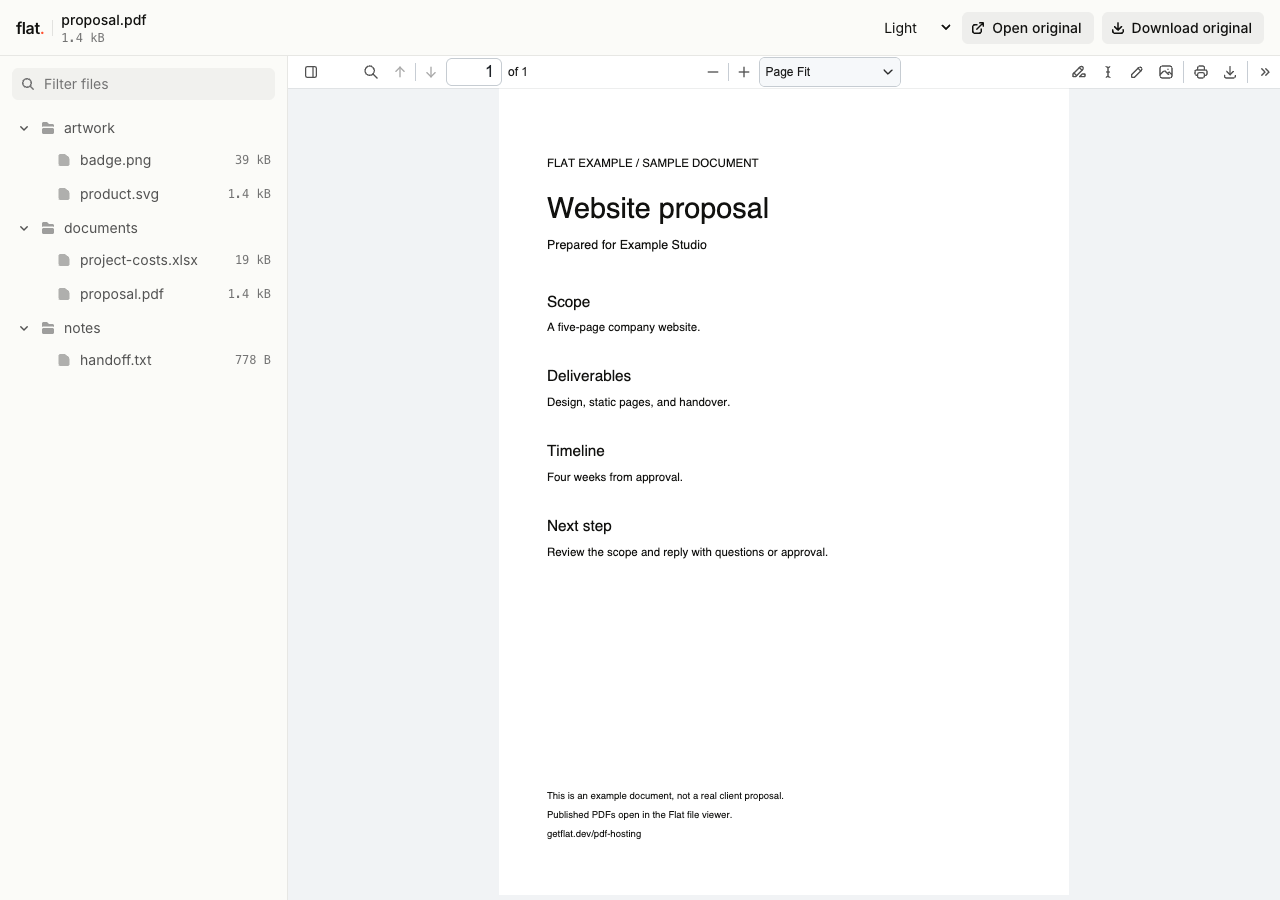
Give clients a proposal and its supporting files
A file collection they can browse
Publish your proposal PDF with its cost workbook and reference images. Flat gives visitors a file list with previews for supported formats, so you do not have to build a page linking to each document.
Readers can download the originals too. A root index.html opens as your website instead of the file explorer. Keep documents in a separate upload when you want that browsing view.
Keep Netlify for its app services
If you use Netlify Forms, Functions, or Git-triggered builds, Netlify handles work that Flat does not. Moving the static files alone will not move those services.
Netlify Drop also accepts folders in the browser. Flat's browser uploader accepts individual files at the top level; use its CLI to preserve subfolders.
Flat vs Netlify Drop
Drop is a way to publish on Netlify, so project settings and plan rules matter too. We checked Netlify's official docs on .
| What you need | Flat | Netlify Drop / Netlify |
|---|---|---|
| Publish without Git | Upload individual files in your browser. Use the CLI for folders and nested assets. Extract website ZIPs before publishing. | Drop a project folder in your browser, including while signed out. You can also publish through the CLI or API without a Git repository.Source |
| Share with a client | Browser uploads are public. Visitors do not need an account. Set a shared visitor password through the CLI or API when you want to limit access. | Check project visibility before sharing. With private-by-default enabled, a new project requires team access until you make it public or set a shared password.Source |
| Keep one address for updates | Publish a new version to the same named address or custom domain through the CLI or API. The browser uploader creates a new version link each time. | Drop the updated output folder onto the existing project's Deploys page. The project address opens the new version.Source |
| Keep earlier versions available | Signed-in uploads have no default expiry, within your storage allowance. Each upload has its own version link. Signed-out uploads expire after one hour. | Each deploy has a unique URL. Default cleanup deletes older deploys after 30 days on Free or 90 days on paid plans, with exceptions for current and latest successful deploys.Source |
| Build a source project | Build or export in your own tools, then upload the finished static files. Flat does not install dependencies or run a build command. | When signed in, Drop can detect your framework and build the project. Signed-out Drop publishes files as-is. Git integration can build on each push.Source |
| Run forms or backend code | Connect forms and other server-dependent features to a separate service. Flat hosts the files; visitors' browsers run your client-side JavaScript. | Netlify includes form handling and serverless functions as part of its wider platform. Keep those services in mind when moving an existing site.Source |
Publish without Git
- Flat
- Upload individual files in your browser. Use the CLI for folders and nested assets. Extract website ZIPs before publishing.
- Netlify Drop / Netlify
- Drop a project folder in your browser, including while signed out. You can also publish through the CLI or API without a Git repository. Source
Share with a client
- Flat
- Browser uploads are public. Visitors do not need an account. Set a shared visitor password through the CLI or API when you want to limit access.
- Netlify Drop / Netlify
- Check project visibility before sharing. With private-by-default enabled, a new project requires team access until you make it public or set a shared password. Source
Keep one address for updates
- Flat
- Publish a new version to the same named address or custom domain through the CLI or API. The browser uploader creates a new version link each time.
- Netlify Drop / Netlify
- Drop the updated output folder onto the existing project's Deploys page. The project address opens the new version. Source
Keep earlier versions available
- Flat
- Signed-in uploads have no default expiry, within your storage allowance. Each upload has its own version link. Signed-out uploads expire after one hour.
- Netlify Drop / Netlify
- Each deploy has a unique URL. Default cleanup deletes older deploys after 30 days on Free or 90 days on paid plans, with exceptions for current and latest successful deploys. Source
Build a source project
- Flat
- Build or export in your own tools, then upload the finished static files. Flat does not install dependencies or run a build command.
- Netlify Drop / Netlify
- When signed in, Drop can detect your framework and build the project. Signed-out Drop publishes files as-is. Git integration can build on each push. Source
Run forms or backend code
- Flat
- Connect forms and other server-dependent features to a separate service. Flat hosts the files; visitors' browsers run your client-side JavaScript.
- Netlify Drop / Netlify
- Netlify includes form handling and serverless functions as part of its wider platform. Keep those services in mind when moving an existing site. Source
Netlify's cleanup keeps the currently published deploy, the latest successful production deploy, and the latest successful deploy for each branch. Its 30-day rule does not mean your live Free site expires after 30 days.
Compare allowances and credits
Flat plans
Free includes 5 MiB per upload, 1 GiB of storage, and 5 GiB of monthly transfer. Named onflat.page addresses and visitor passwords are included.
Starter is €9 a month for 100 MiB per upload, 50 GiB of storage, 100 GiB of monthly transfer, and 1 custom domain.
Flat counts delivered files, previews, and viewer assets toward transfer. If you use up the allowance, delivery pauses until it resets or you upgrade. Files stay stored, and Flat does not charge automatic overages.
Netlify credit-based plans
Free includes 300 credits a month and custom domains with SSL. Personal is US$9 a month for 1,000 credits. Pro starts at US$20 a month for 3,000 credits with unlimited team members and shared password protection.
A production deploy uses 15 credits. Bandwidth uses 20 credits per GB, and web requests use two credits per 10,000 requests. These draw from the same balance; deploy previews do not consume deployment credits.
Free has a hard credit limit. Personal and Pro let you buy more credits with optional auto recharge. Accounts created before September 4, 2025 may still use legacy plans with different rules.
Flat prices are in EUR and allowances use MiB and GiB. Netlify prices above are in USD, with bandwidth in GB. Higher Flat upload limits do not increase document preview limits.
Try a document before moving your site.
Upload a PDF or select several files to see the reader view. Browser uploads are public and ask for your email while signed out. Sign in within one hour to keep the upload online.
Checking your upload limits... · Public · Limits
Drop your documents or HTML files here
or choose files from your device.
Select filesNeed sample files? Download the proposal PDF and cost workbook shown in the file collection. For a website folder, use the CLI below.
Move a static copy from Netlify
Publish your finished output
Use your local build output, or download the deployed files from Netlify's deploy details page and extract the ZIP. Keep index.html at the root of your site folder.
With Node.js 20 or newer, publish that folder:
npx -y @getflat/cli deploy ./distReplace ./dist with your folder path. Open the returned URL. Run npx -y @getflat/cli login before the one-hour expiry to keep a signed-out upload.
Check routes, forms, and access
Flat does not apply netlify.toml, _redirects, or _headers rules. Open nested page URLs directly and refresh them. Flat has no automatic single-page app fallback.
Check form submissions and any function calls. Connect them to a working backend before switching. Set any visitor password again through Flat's CLI or API.
Once the copy works, connect your own domain or use a named Flat address. Your netlify.app address stays with Netlify.
Before you switch
Does Netlify Drop require Git or an account?
No. Netlify documents folder drops without an account or Git repository. Signed-out drops publish files as-is; signed-in Drop can build supported projects. Its anonymous CLI deployments have a one-hour claim window.
Can I drag a folder or ZIP into Flat?
Flat's browser uploader accepts individual files with unique filenames at the top level. It does not preserve dropped folders or extract ZIPs. Extract the archive and publish its folder with the CLI. See HTML publishing instructions.
Can clients open a link without signing in?
Yes. Flat's browser uploads are public, and a visitor password does not require a Flat account. On Netlify, check the project's visibility. New teams created on or after July 28, 2026 default to private new projects. Make the project public when you want anyone with its URL to open it.
Can Flat host my React or Next.js site?
Flat can serve a compatible static build or export. It does not run server rendering, API routes, or Server Actions. A client-side app also needs routes that work without Netlify's rewrite rules. Keep Netlify if your site depends on its runtime.
See what your client will open.
Publish a copy of your files, check the previews, and download an original before sharing the link.